SoarmMoce SDK (Python) Quick Start Guide
This guide provides instructions for getting started with the soarmMoce_sdk. The SDK is integrated into the official SoarmMoce repository and supports a seamless transition from Mock simulation to real hardware control.
1. Environment Setup (Recommended: venv)
Execute the following commands in the repository root directory to ensure environment isolation and complete dependency management:
Bash
# Navigate to your local repository path
cd /path/to/Soarm_Moce

# Create and activate a virtual environment
python3 -m venv .venv
source .venv/bin/activate

# Install the SDK and development dependencies in editable mode
pip install -e ./soarmMoce_sdk[dev]
2. Configuration Files
The SDK uses a unified yaml configuration system. The default template is located at: configs/soarm_moce.yaml.
-
Path Resolution: The SDK Config Loader automatically resolves relative paths for URDF or Calibration files based on the directory where the configuration file is located.
-
Resource Fallback: If a local path is not found, the system automatically falls back to the package’s built-in resources.
3. Quick Verification (Mock Mode)
Run examples using the MockTransport without requiring physical hardware:
Bash
# 1. Basic connection test
python soarmMoce_sdk/examples/00_quickstart_connect.py

# 2. Kinematics (IK) test
python soarmMoce_sdk/examples/02_movepose_ik.py
Expected Output:

-
The terminal prints the current Joint State (Mock data).
-
move_pose(xyz, rpy)successfully triggers the IK solver and proceeds to themove_jointsworkflow.
4. Running Tests
It is recommended to run the test suite after any code changes to ensure core logic integrity:
Bash
pip install lark
pytest -q
Test Coverage:

-
Safety Limits: Validation of limit and safety logic.
-
Transport Layer: Read/write logic for Mock Transport.
-
Consistency: FK/IK consistency checks ($IK(FK(q)) \approx q$).
5. Simulation Visualization
To visualize the robot arm posture, use the PyBullet simulation:
Bash
pip install pybullet
python soarmMoce_sdk/examples/03_sim.py
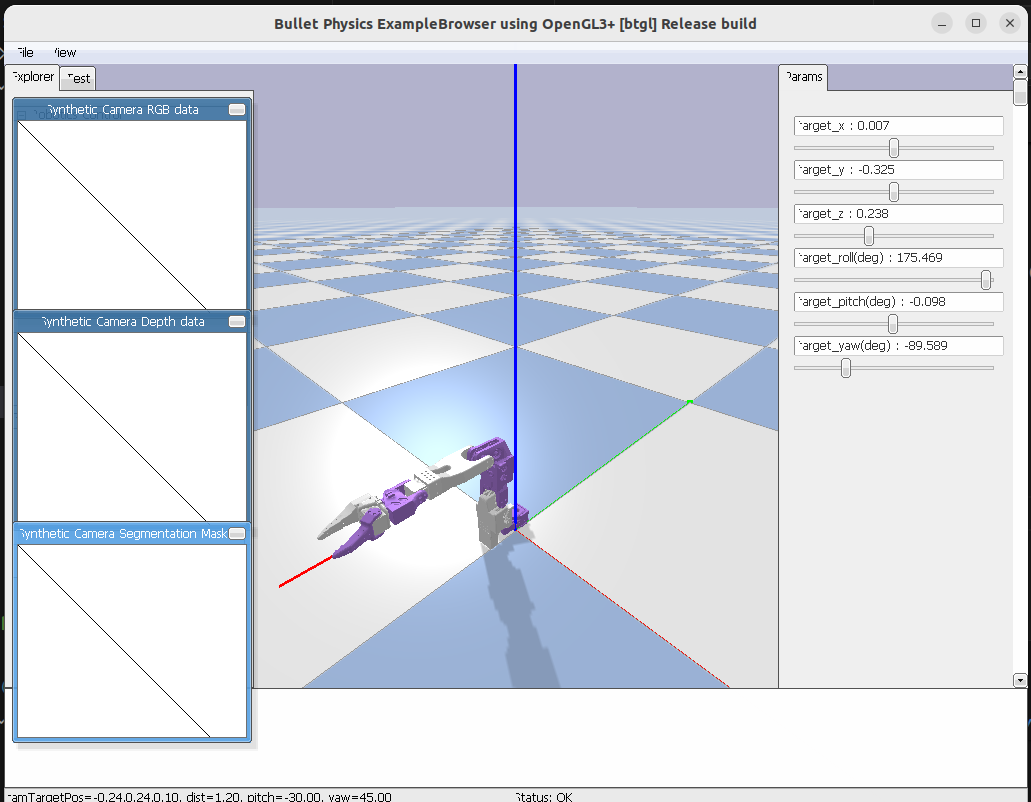
-
Features: Automatically resolves Mesh paths in the URDF, avoiding common
package://path errors. -
Interaction: Use sliders in the GUI to observe IK results in real-time.
6. Hardware Integration (TCP Server)
To connect to a running SoarmMoce TCP server, modify configs/soarm_moce.yaml:
YAML
transport:
  type: tcp
  host: 192.168.66.130  # Change to your Server IP
  port: 6666

protocol:
  unit: deg            # Important: Communication unit (usually deg)
  sdk_to_server_map:   # Joint mapping: SDK Name -> Server Name
    shoulder: shoulder_pan
    elbow: elbow_flex
    wrist: wrist_flex
Quick Connection Snippet
Python
from soarmMoce_sdk.api.robot import Robot

# Initialize and connect
r = Robot.from_config("./configs/soarm_moce.yaml").connect()

# 1. Get current state
print("Current q:", r.get_joint_state().q)

# 2. Perform a moveJ at current position (Loopback test)
r.move_joints(r.get_joint_state().q, duration=1.0)

r.disconnect()
Key Technical Notes:
Unified Units: The SDK external interface consistently uses radians (rad). Unit conversion for the TCP layer (e.g., to degrees) is handled automatically via
protocol.unit.Mapping Validation:
sdk_to_server_mapperforms a full coverage check during initialization. Missing mappings will raise aProtocolErrorto prevent incorrect axis movement.
7. Common API Reference
Python
from soarmMoce_sdk.api.robot import Robot
import math

robot = Robot.from_config("./configs/soarm_moce.yaml").connect()

# Read: Get joint state
js = robot.get_joint_state()
print(f"Joint angles (rad): {js.q}")

# Write: Joint space movement (moveJ)
robot.move_joints(js.q, duration=1.0)

# Write: Cartesian space movement (move_pose)
# Input: xyz (meters) + rpy (radians), internal IK solver is used
robot.move_pose(
    xyz=(0.20, 0.00, 0.15),
    rpy=(math.pi, 0.0, 0.0),
    duration=2.0
)

robot.disconnect()
Troubleshooting
-
Data Not Updating: Check the
transportIP and port configuration; ensure the Server is active. -
Reversed Motion / Wrong Axis: Verify
sdk_to_server_mapand thecalibrationfields in the config file. -
IK Unreachable: Ensure the target coordinates are within the physical workspace of the robot arm.